Desk Setup Tips for Boosting Focus and Comfort
Creating an effective desk setup can make a big difference in your productivity, focus, and overall comfort during work or study. Whether you work from home or in an office, your desk environment plays an important role in how well you concentrate and how comfortable you feel throughout the day.
In this post, we’ll explore practical desk setup tips that will help you stay focused, reduce strain, and create a pleasant workspace tailored to your needs.
Why a Good Desk Setup Matters
Having a well-organized and ergonomic workspace is essential because it:
– Reduces physical discomfort such as neck and back pain
– Minimizes distractions and clutter
– Improves posture and circulation
– Boosts mental clarity and motivation
– Enhances overall work efficiency
Taking a little time to adjust your setup can have a lasting impact on your day-to-day productivity and well-being.
Choose the Right Desk and Chair
Desk Height and Space
Your desk should allow your arms to rest comfortably at a 90-degree angle when typing or writing. If the desk is too high or too low, it can cause strain on your shoulders and wrists.
– Aim for a desk height around 28–30 inches, but adjust based on your height
– Ensure the desk surface has enough space for your computer, notes, and essential supplies without feeling cramped
– Consider a desk with adjustable height options if you want to alternate between sitting and standing
Supportive Chair
Sitting comfortably is key to staying focused. Look for a chair that:
– Supports the natural curve of your spine
– Has adjustable height and backrest settings
– Provides cushioning without being too soft
– Allows your feet to rest flat on the floor or on a footrest
Taking breaks to stand or stretch every hour can also help reduce discomfort.
Optimize Monitor and Screen Position
Monitor Height and Distance
Position your computer screen so that the top of the monitor is roughly at or just below eye level. This helps prevent neck strain.
– Place the monitor about an arm’s length away
– Tilt the screen slightly upward for easier viewing
– Use a monitor stand or adjustable arm if needed
Reduce Glare and Eye Strain
Consider lighting and screen settings to protect your eyes:
– Avoid placing screens directly opposite windows or bright light sources to minimize glare
– Use adjustable blinds or curtains to control natural light
– Adjust screen brightness and contrast to comfortable levels
– Remember the 20-20-20 rule: every 20 minutes, look at something 20 feet away for 20 seconds
Organize Your Desk for Efficiency
Declutter Your Workspace
A cluttered desk can distract and overwhelm. Keep only what you need daily within reach. Use storage solutions like:
– Drawer organizers
– Desk trays
– Pen holders
Arrange Items by Frequency of Use
Place frequently used items (notepad, pens, phone) closer to you, and store less-used materials further away. This reduces unnecessary movement and keeps your workflow smooth.
Cable Management
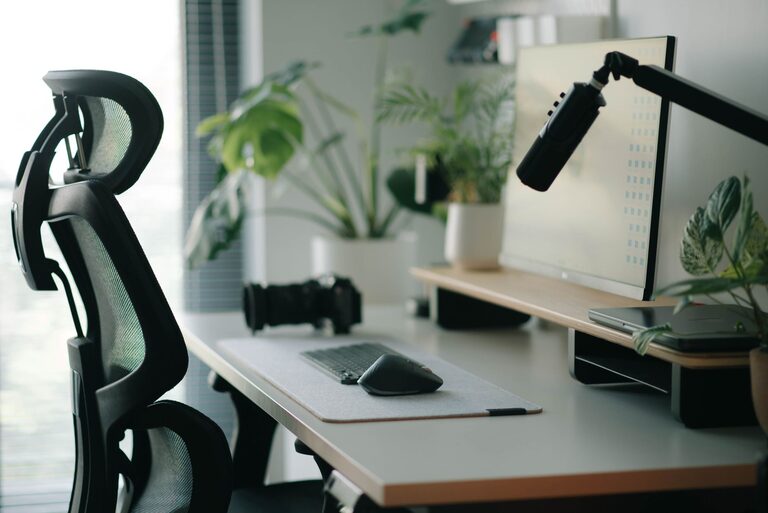
Tidy cables can make your workspace look neater and prevent tangling. Use clips, ties, or a cable sleeve to keep cords organized.
Personalize Your Space Mindfully
Add Comfort Items
Small touches can increase comfort and mood:
– A soft mouse pad with wrist support
– A cushion or lumbar pillow for your chair
– An adjustable desk lamp with warm light
Incorporate Greenery
Plants can improve air quality and provide a calming effect. Choose low-maintenance varieties like succulents or spider plants.
Limit Distractions
While it’s nice to personalize your space, avoid overcrowding your desk with non-work items that might draw your attention away.
Improve Air Quality and Lighting
Good air circulation and lighting contribute to comfort and focus.
– If possible, open windows or use a small fan for fresh air circulation
– Use natural light during the day to reduce eye strain and improve mood
– Supplement with soft, warm artificial lighting to avoid harsh shadows
Maintain Good Habits
Your desk setup works best when combined with healthy habits:
– Take regular breaks to stand, stretch, or walk around
– Keep hydrated with water nearby
– Practice good posture and adjust your setup as needed
– Clean and organize your desk weekly to maintain a pleasant environment
Final Thoughts
A thoughtful desk setup balances ergonomics, organization, and personal comfort. By making simple adjustments to your furniture, monitor placement, and workspace organization, you can create an environment that supports your focus and well-being. Remember, the best setup is one that fits your unique needs and encourages consistent, comfortable work habits.
Try some of these tips today and notice how a better workspace can improve your productivity and comfort.